


Logitech G Saitek Pro Flight Yoke System – Bring the Skies to Kenya’s Sim Pilots
For aspiring aviators in Kenya—from Nairobi to Mombasa, Eldoret to Kisumu—there’s no better way to simulate the cockpit experience than the Logitech G Saitek Pro Flight Yoke System. This premier flight control setup delivers authentic yoke movement, precision-engineered components, and smooth flight experience just like a real aircraft. Whether you’re flying Cessnas or jumbo jets in Microsoft Flight Simulator, this yoke system immerses you fully into aviation.
Designed for accessibility, realism, and durability, the Pro Flight Yoke System matches the needs of both beginners and experienced sim pilots. With dual axis yoke, integrated throttle quadrant, programmable buttons, and industry-grade build quality, it replicates cockpit control from takeoff through landing. Best of all, when you buy from PS5 Kenya, you get authentic equipment, local warranty support, and nationwide delivery.
Authentic Flight Control for Enthusiasts and Students
Flying virtually is more demanding than ever. Visuals are stunning, weather systems are dynamic, and aircraft systems are complex. To match this evolution, your hardware must be equally sophisticated—and that’s where the Pro Flight Yoke System shines.
The dual-axis yoke reproduces real aircraft movement: twist the yoke for accurate rudder control and move it back and forth to pitch up or down. The yoke’s resistance feels authentic, delivering natural aerodynamics that respond like real flight controls.
Mounting the yoke to your desk is quick and secure thanks to integrated clamp systems. Whether you're using a home desk or a pilot training cockpit, the system holds firm, with no wobble or slippage during intense maneuvers.
The yoke replicates a full-sized control wheel, letting you perform coordinated turns, flaps control, trim adjustments, and nose wheel steering as if you were in an actual cockpit.
Precision-Engineered Build for Long-Term Use
This control yoke system isn’t built like a toy. Its robustness and reliability come from pro-grade engineering standards, meant to withstand extensive hours of training or recreational use.
The steel yoke spindle and dual-ball-bearing chassis offer smooth, accurate motion with high torque resistance. This system mimics real aircraft control feel, minimizing dead zones and slop.
The base platform is made from rugged ABS polymer reinforced with metal components. That means you can grip the yoke firmly during crosswind landings or hard bank turns without any shifting or give.
High-resolution potentiometers inside ensure the smallest movement translates precisely into simulation input. Whether adjusting trim or manually aligning the runway, the response is crisp and repeatable.
All controls—including the yoke, throttle lever, and button array—are built to resist wear. These are not cheap plastic parts but rugged components that stay calibrated, responsive, and quiet after hundreds of flights.
Easy Setup with Complete Mounting Support
One of the greatest frustrations in sim flying is unstable gear mounting. If your hardware wiggles on throttle, yoke, or joystick, immersion shatters. The Pro Flight Yoke System prevents this.
The yoke clamps securely under your desk or over your dual-monitor stand. A rubber-padded metal clamp grips firmly without scratching surfaces.
The throttle quadrant also clamps securely and interlocks smoothly with the yoke to prevent sliding during heavy input. These clamp systems mean you can reposition or remove the system in minutes without tools.
Power and USB connectivity are handled via a single cable—plug into your PC or PS5 and fly. The system works seamlessly with Windows, and many users run it on console/stream deck combinations with third-party profiles on PC-first setups.
Integrated Throttle Quadrant with Six Programmable Controls
Beyond the yoke itself, the throttle quadrant adds an essential control layer. It places vital flight levers at your fingertips:
-
Throttles: Adjust both engines precisely with finely tuned detents.
-
Mixture lever: For GA aircraft requiring lean/rich control.
-
Prop lever: Control prop pitch in turboprop or piston twins.
-
Trim dial: One-handed attitude control without toggling off your yoke grip.
-
Integrated Buttons: Six backlit buttons and a two-position flap switch that are fully programmable via official Logitech software or other cockpit plugins.
This rich control set allows you to leave the keyboard untouched during flight. Control thrust, flaps, mixture, and trim with a single hand, keeping your other hand on the yoke—just like in real aviation.
Software Customization for Every Simulator
Whether you're flying in X-Plane, Prepar3D, MSFS, or any other supported platform, the Pro Flight Yoke System adapts to your setup.
The Logitech G software allows you to:
-
Map every button and switch to simulator functions.
-
Assign multi-position switches to taxi lights, autopilot, or comm radios.
-
Calibrate axis sensitivity, dead zones, and center points to match aircraft types.
-
Save and switch between profiles—ideal for sim schools, instructor-led flights, and multiplayer sessions.
This flexibility puts power in your hands. You can create a single-engine Cessna lockout profile for VFR flights and switch seamlessly to a multi-engine business jet layout—all mapped physically on your hardware.
Ideal for Training, Enthusiasts, and Casual Users
Sim pilots in Kenya come from diverse backgrounds. Whether you’re learning flight basics, performing advanced instrument procedures, or flying VFR sightseeing routes, the Pro Flight Yoke System fits the bill.
Students attending virtual flight school or needing certification practice benefit from the yoke’s realism in pitch and roll. Integrated controls match real-world procedures, reducing training gaps.
Hobbyists flying GA, bush trips, or multiple aircraft types find the system adapts instantly. You can quickly configure it for Cessna 172, Baron 58, or King Air with a few clicks.
Even casual users enjoy the immersive experience. No more awkward camera keyboard switches or controller compromises—the yoke system delivers an authentic, fun, and organized cockpit over ordinary gamepads.
Why Buy from PS5 Kenya – Local Benefits That Matter
Buying this premium flight system is a major decision. Here’s why choosing PS5 Kenya adds real value:
-
Genuine stock with warranty: All Logitech gear is official and backed locally for repairs or replacements.
-
Nationwide delivery: Nairobi, Mombasa, Kisumu, Eldoret—your yoke system reaches you in days, not weeks.
-
Mounting tips included: Our packing includes guidance on best clamp practices and setup to avoid slippage or damage.
-
Expert after-sales support: Hardware quirks? Software issues? We solve them locally—no overseas wait times.
-
Flexible Payments: Use M-Pesa, bank transfers, or LPO for institutional orders—no overseas credit hassles.
PS5 Kenya ensures your purchase is smooth from cart to cruising altitude.
Watch the Control Wheel in Action
See the Logitech G Saitek Pro Flight Yoke System perform real-world simulation with bolt-tight clamping, dual engines, and precise calibration. This demo highlights airflow control, system flexibility, and setup ease:
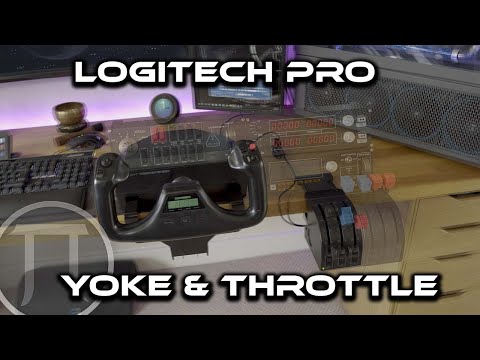
This video showcases smooth yoke tension, throttle axis control, and programmable switches in flight mode, proving why it’s the flagship sim yoke solution.
Enhance Your Flight with Full-Motion Kit Add-Ons
For pilots looking to push immersion even further, the optional Logitech Rudder Pedals work seamlessly with the yoke, offering coordinated flight, taxi control, and a full rudder axis. While sold separately, the pedals integrate perfectly and feature dual differential toe brakes.
On top of that, PS5 Kenya offers optional cockpit desk and seat bundles that convert your home space into a mini flight station. Combined with the yoke system, it’s a full-motion sim experience designed for realism on a budget.
Frequently Asked Questions
Can this work with PS5?
While officially only for PC, many Kenyan sim pilots use a PC-to-PS5 pass-through hybrid setup, or console-compatible mapping tools. You’ll need PC configuration, but once set up, it works with console input through USB passthrough.
What simulators are supported?
It's compatible with Microsoft Flight Simulator, X-Plane, Prepar3D, and most flight sim platforms with joystick support on Windows. Third-party tools expand its reach to consoles and train sims.
Is it easy to install?
Yes. The system clamps to any 2–3cm thick desk or cockpit surface. Soft pads prevent scratches, and calibration is plug-and-play via Logitech software.
Do the throttle and yoke move smoothly?
Yes. High-resolution potentiometers and ball-bearing mechanisms provide smooth, accurate control without grinding or delay.
How many buttons can be programmed?
There are six buttons on the throttle quadrant, plus a two-position flap lever. On the yoke, there's a friction-adjustable switch and twin axis twist control—ample input for most aircraft.
Does Logitech offer support locally?
Yes. PS5 Kenya handles all warranty support, stock, and after-sales service—no international shipping required.
Discover the Next Level of Flight Simulation
The Logitech G Saitek Pro Flight Yoke System brings desk-bound simulation to life. With a realistic yoke, professional throttle quadrant, customizable switch bank, and aircraft-grade construction, it delivers unmatched immersion.
Whether you’re training for real pilot certification, refining VFR flying skills, or enjoying high-fidelity virtual aviation over Nairobi’s skyline, this system transforms your environment into a cockpit you can interact with every day.
Pair it with rudder pedals, optional cockpit mounts, and your precision joystick configuration—and you have Kenya’s most complete flight sim setup.
By choosing PS5 Kenya, you get presence stock, local service, expert setup advice, optional add-ons, and simple payment—everything you need to reach cruising altitude in virtual flight.
Explore the skies like never before with the Logitech G Saitek Pro Flight Yoke System—available now at PS5 Kenya.